How to Check How Many SIMs Are Registered on My CNIC? (2026 Guide)
1. Why You Must Check SIMs on Your CNIC Right Now
Here is a scary truth.
Someone can walk into a SIM franchise today, hand over a photocopy of your CNIC, and activate a mobile number in your name — without you ever finding out. According to PTA data, this happens more than most people think.
Once that SIM is active, the registered owner on record is you. Every call, every message, and every transaction made from that number traces back to your CNIC. If that number is used for fraud, harassment, or any crime, law enforcement contacts you first.
That is why doing a SIMs on CNIC check is not optional. It is a basic safety habit — like checking your bank balance.
The good news? PTA makes it incredibly easy. You can do it in under 60 seconds, for free, right now.
2. What Is the PTA SIM Information System?
The PTA SIM Information System is the official government database that stores the details of every active SIM card in Pakistan. It was launched in 2009 by the Pakistan Telecommunication Authority (PTA) to bring all mobile registrations under one centralized record.
Every time a SIM is activated anywhere in Pakistan — whether at a Jazz franchise in Lahore or a Zong outlet in Quetta — the following six data points are stored:
| Data Point | What It Means |
|---|---|
| Owner Name | Your name as per NADRA records |
| CNIC Number | Your 13-digit national identity number |
| Network Operator | Jazz, Zong, Telenor, Ufone, SCO, or ONIC |
| Activation Date | Date and time the SIM was registered |
| Biometric Verification Status (BVS) | Whether your fingerprint confirmed the registration |
| SIM Status | Active, Suspended, or Blocked |
This data is managed jointly by NADRA and PTA through the Subscriber Verification Management System (SVMS) and the Central SIM Database (CSMD). When you do a CNIC SIM check, you are pulling a live view from this system.
For a detailed breakdown of how this data is structured, visit the SIM Information page on sim.net.pk.
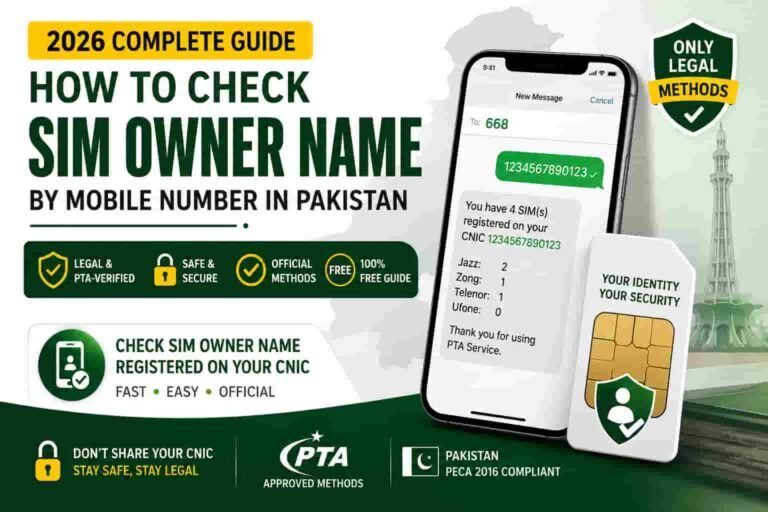
3. Method 1: Check SIMs on CNIC via SMS to 668 (Fastest)
This is the quickest and most recommended method. No internet needed. Works on all Pakistani networks — Jazz, Zong, Telenor, Ufone, SCO, ONIC.
Step-by-step:
Step 1: Open the Messages/SMS app on your phone.
Step 2: Type your 13-digit CNIC number — without any dashes or spaces.
Example: 3520112345678
Step 3: Send this message to 668.
Step 4: Wait. You will receive a reply within 60 seconds.
What the reply looks like:
“Dear Customer, 3 SIMs are registered on your CNIC: 0301-XXXXXXX (Jazz), 0332-XXXXXXX (Ufone), 0312-XXXXXXX (Zong). For details visit cnic.sims.pk.”
That is your SIM count, live, direct from PTA.
Important things to know:
- Standard SMS charges may apply (around Rs. 2 + tax per message).
- Do not add dashes, hyphens, or spaces — type only the 13 digits.
- The reply shows the network name next to each number.
- This method works even without a data connection.
For a complete guide on this method, read the 668 Code page on sim.net.pk.
4. Method 2: Check SIMs on CNIC Online at cnic.sims.pk
If you want a more detailed view — like a table with operator-wise breakdown — use the official PTA online portal.
Step-by-step:
Step 1: Open a browser and go to cnic.sims.pk
Make sure you type the address correctly. The only official portal is cnic.sims.pk. Do not use any look-alike or unofficial website.
Step 2: Enter your CNIC number in the field provided. Again, no dashes.
Step 3: Complete the CAPTCHA to confirm you are human.
Step 4: Click the Submit button.
Step 5: The system displays a table showing how many SIMs are registered on your CNIC, broken down by each mobile network.
Advantages of the online method:
- Shows a detailed table instead of just a text message.
- You can take a screenshot and save it as a dated record.
- Useful if the 668 SMS does not deliver due to network issues.
- Accessible from a laptop, tablet, or smartphone.
For a full walkthrough with screenshots and tips, visit the cnic.sims.pk guide on sim.net.pk.
5. How Many SIMs Are Allowed on One CNIC?
As of 2026, the official PTA limit is:
| SIM Type | Maximum Allowed Per CNIC |
|---|---|
| Voice SIMs | 5 (across all networks combined) |
| Data SIMs | 3 (across all networks combined) |
| Total Combined | 8 SIMs per CNIC |
This limit was set by the Supreme Court of Pakistan and has been enforced by PTA since 2015. The 5-voice cap was introduced first to curb fraud and illegal activity. The 3-data SIM allowance was added on top of it.
Under the 2026 PTA enforcement framework, if your CNIC exceeds these limits, the system can automatically suspend all SIMs linked to your CNIC — including your primary number — until you bring the count within the allowed range.
Also, since January 2024, there is a 7-day waiting period between new SIM activations on the same CNIC. So if you buy one SIM today, you cannot activate another on the same CNIC for 7 days.
And as of May 2026, any newly activated SIM cannot be disowned or transferred for 365 days from activation (except in proven fraud cases).
So if your SIM count is already at the limit, you must formally deactivate excess SIMs before you can get a new one.
6. What the Result Screen Actually Shows You
Whether you use 668 or cnic.sims.pk, the result is the same data — just displayed differently.
Here is what each piece of information means:
Network Name (Jazz / Zong / Telenor / Ufone / SCO / ONIC) This tells you which telecom operator that SIM belongs to.
Mobile Number The 11-digit number registered on your CNIC. Partially masked for privacy in some views.
SIM Status
- Active: SIM is working normally.
- Suspended: SIM has been temporarily blocked, possibly due to limit violations or non-biometric verification.
- Blocked: SIM has been permanently deactivated.
Biometric Verification Status (BVS) Shows whether your fingerprint was used to register that SIM. PTA now requires biometric verification for all SIM activations. If a SIM shows as “not verified,” that is a red flag.
A blocked or suspended SIM still appears in your count until it is formally removed from PTA’s system.
7. What to Do If You Find an Unknown SIM on Your CNIC
Stay calm. This is more common than most people expect, and there is a clear process to fix it.
Step 1: Identify the network
The 668 reply or cnic.sims.pk result shows which operator the unknown SIM belongs to — Jazz, Zong, Telenor, Ufone, SCO, or ONIC.
Step 2: Visit the operator’s nearest franchise
Bring your original CNIC. Walk in and tell them:
“A SIM is registered on my CNIC that I did not activate. I want to disown and deactivate it.”
You will likely need to complete biometric verification at the counter. The process usually takes under 30 minutes.
Operator helplines (if you want to call first):
| Network | Helpline |
|---|---|
| Jazz | 111 |
| Zong | 310 |
| Telenor | 345 |
| Ufone | 333 |
Step 3: File a complaint with PTA
Go to complaint.pta.gov.pk and file a formal complaint about the unauthorized SIM registration. This creates an official record in your name.
You can also call PTA’s free helpline: 0800-55055
Step 4: Report to NADRA
Visit nadra.gov.pk/customer-support to alert NADRA that your CNIC may have been misused. This protects you in case the same data was used for other fraud (like mobile wallet accounts).
Step 5: Check again after 48–72 hours
After the franchise confirms deactivation, run the 668 check again. The SIM should no longer appear on your count.
Also check the detailed walkthrough on what to do right after you check SIM owner details on sim.net.pk for a full post-check action plan.
8. Common Mistakes People Make During CNIC SIM Check
Mistake 1: Typing the CNIC with dashes
The most common error. The 668 SMS and cnic.sims.pk both require the number without dashes. Type all 13 digits as one unbroken string.
Wrong: 35201-1234567-8 Right: 3520112345678
Mistake 2: Using unofficial or fake websites
Several websites have URLs that look like the official PTA portal. Only one portal is official: cnic.sims.pk. Avoid typing your CNIC into any other website you are not sure about.
Mistake 3: Assuming USSD codes work for SIM checks
Jazz *99#, Zong *310#, Telenor *345#, and Ufone *333# do not show SIM owner details or your CNIC SIM count. They open network service menus. Do not rely on them. Read the full USSD Codes and SIM Owner Details guide to understand why.
Mistake 4: Thinking SMS to 667 checks all your SIMs
Sending MNP to 667 only tells you whether the SIM currently in your phone is registered on your CNIC. It does not show all SIMs on your CNIC. For the full list, use 668 or cnic.sims.pk.
Mistake 5: Checking only once and forgetting
SIM fraud is not a one-time risk. Fraudsters can attempt registration at any time. Make it a habit to check every 2 to 4 weeks. Set a reminder on your phone.
Mistake 6: Not saving the result
If you ever need to file a complaint or prove your SIM count at a specific date, a screenshot of the result is your evidence. Take one every time you check.
9. Frequently Asked Questions
Is the SIMs on CNIC check free?
The cnic.sims.pk portal is completely free. The 668 SMS may carry a small standard charge of around Rs. 2 plus tax, depending on your network.
Can I check SIMs registered on someone else’s CNIC?
No. You can only check the SIMs registered on your own CNIC. Attempting to access another person’s SIM registration data without authorization is a violation of Pakistani law under PECA 2016.
What if my SIM count is higher than I expected?
Do not panic. First, think about whether a family member may have activated a SIM using your CNIC during an emergency or while you were abroad. If the number is genuinely unknown, follow the steps in Section 7 above to disown and deactivate it.
How long does it take to deactivate an unauthorized SIM?
Most operator requests are processed within 24 to 72 hours after visiting the franchise. PTA escalations may take a few additional working days.
What if my biometric verification fails at the franchise?
Visit a NADRA registration center to update or re-verify your biometric data. Outdated fingerprint records are a common reason for biometric failures.
Can I check SIM details using network apps like Simosa, My Telenor, My Zong, or UPTCL?
No. These apps manage your packages, balance, and account settings. None of them show SIM owner details or how many SIMs are registered on your CNIC. Use 668 or cnic.sims.pk only.
Can a foreigner or overseas Pakistani check their SIM count?
Yes. The cnic.sims.pk portal has a separate option for foreign nationals. Overseas Pakistanis can use their NICOP to check SIMs registered on their identity document.
What happens if I exceed the SIM limit?
Under PTA’s 2026 enforcement rules, exceeding the limit can trigger automatic suspension of all SIMs on your CNIC. You will need to formally disown excess SIMs at a franchise before any line is restored or any new SIM can be activated.
Is there a PTA WhatsApp assistant I can use?
Yes. PTA launched a digital assistant on WhatsApp in early 2026. You can reach it through PTA’s official contact channels for guided support on SIM-related issues.
How often should I check?
PTA recommends checking at least once a month. For higher security, check every 2 weeks.
Sources:
The information in this guide is sourced from official government and regulatory bodies. All methods and rules cited are verified as of 2026.
- Pakistan Telecommunication Authority (PTA) — SIM Information System, official codes, SIM limit regulations, and fraud alerts. Website: pta.gov.pk
- NADRA (National Database and Registration Authority) — CNIC registration, biometric verification records, and customer support. Website: nadra.gov.pk
- cnic.sims.pk — Official PTA SIM Information portal for CNIC-based SIM verification.
- PTA Complaint Management System (CMS) — For filing complaints about unauthorized SIM registrations. Website: complaint.pta.gov.pk
- Supreme Court of Pakistan — November 2015 ruling on SIM limits per CNIC (5 voice + 3 data).
- Pakistan Electronic Crimes Act (PECA) 2016 — Legal framework for unauthorized access to SIM and identity data.
- PTA Subscriber Antecedents Verification Regulations 2015 (updated 2024) — Mandatory biometric verification and SIM registration rules.
- PTA Advisory, May 2026 — 365-day SIM disowning restriction for newly activated numbers.